dirvish.vim :zap:
=================
Path navigator designed to work with Vim's built-in mechanisms and
[complementary](https://github.com/tpope/vim-eunuch)
[plugins](https://github.com/tpope/vim-unimpaired).
 Features
--------
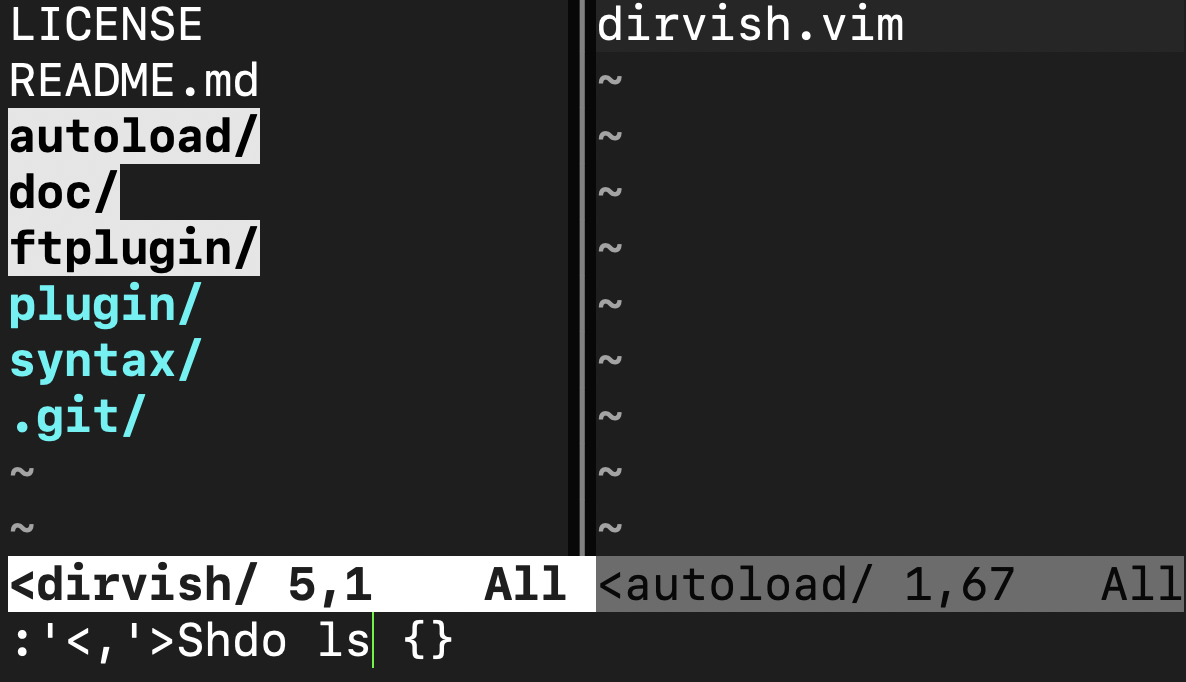
- _Simple:_ Each line is just a filepath
- _Flexible:_ Mash up the buffer with `:g`, automate it with `g:dirvish_mode`
- _Safe:_ Never modifies the filesystem
- _Non-intrusive:_ Impeccable defaults. Preserves original/alternate buffers
- _Fast:_ 2x faster than netrw
- _Intuitive:_ Visual selection opens multiple files
- _Powerful:_ `:Shdo[!]` generates shell script
- _Reliable:_ Less code, fewer bugs (96% smaller than netrw). Supports Vim 7.2+
Concepts
--------
### Lines are filepaths
Each Dirvish buffer contains only filepaths, hidden by [conceal](https://neovim.io/doc/user/syntax.html#conceal).
- Use plain old `y` to yank a path, then feed it to `:r` or `:e` or whatever.
- Sort with `:sort`, filter with `:global`. Hit `R` to reload.
- Append to quickfix (`:'<,'>caddb`), iterate with `:cdo`.
- Script with `:Shdo[!]`.
- `:set ft=dirvish` on any buffer to enable Dirvish features:
```
git ls-files | vim +'setf dirvish' -
```
### Buffer name is the directory name
So commands and plugins that work with `@%` and `@#` do the Right Thing.
- Create directories:
```
:!mkdir %foo
```
- Create files:
```
:e %foo.txt
```
- Use `@#` to get the Dirvish buffer from a `:Shdo` buffer:
```
:Shdo
mkdir #.bk
Z!
```
### Edit Dirvish buffers
For any purpose. It's safe and reversible.
- Use `:sort` or `:global` to re-arrange the view, delete lines with `d`, etc.
Then `:%Shdo` the result.
- Pipe to `:!` to see inline results:
```
:'<,'>!xargs du -hs
```
- Type `u` to undo, or `R` to reload.
### Work with the :args list
The [arglist](https://neovim.io/doc/user/editing.html#arglist) is an ad-hoc list of filepaths.
- Type `x` to add files to the (window-local) arglist.
- Iterate with standard commands like `:argdo`, or [plugin](https://github.com/tpope/vim-unimpaired) features like `]a`.
- Run `:Shdo!` (mapping: `[count].`) to generate a shell script from the arglist.
Extensions
----------
Some people have created plugins that extend Dirvish:
- [remote-viewer](https://github.com/bounceme/remote-viewer) - Browse `ssh://` and other remote paths
- [dirvish-git.nvim](https://github.com/brianhuster/dirvish-git.nvim) - Show git status of each file
- [vim-dirvish-git](https://github.com/kristijanhusak/vim-dirvish-git) - Show git status of each file
- [vim-dirvinist](https://github.com/fsharpasharp/vim-dirvinist) - List files defined by projections
- [dirvish-do.nvim](https://github.com/brianhuster/dirvish-do.nvim) - Add file manipulation keybindings
- [vim-dirvish-dovish](https://github.com/roginfarrer/vim-dirvish-dovish) - Add vim-style file manipulation commands
Credits
-------
Dirvish was originally forked (and completely rewritten) from
[filebeagle](https://github.com/jeetsukumaran/vim-filebeagle) by Jeet Sukumaran.
Copyright 2015 Justin M. Keyes.
Features
--------
- _Simple:_ Each line is just a filepath
- _Flexible:_ Mash up the buffer with `:g`, automate it with `g:dirvish_mode`
- _Safe:_ Never modifies the filesystem
- _Non-intrusive:_ Impeccable defaults. Preserves original/alternate buffers
- _Fast:_ 2x faster than netrw
- _Intuitive:_ Visual selection opens multiple files
- _Powerful:_ `:Shdo[!]` generates shell script
- _Reliable:_ Less code, fewer bugs (96% smaller than netrw). Supports Vim 7.2+
Concepts
--------
### Lines are filepaths
Each Dirvish buffer contains only filepaths, hidden by [conceal](https://neovim.io/doc/user/syntax.html#conceal).
- Use plain old `y` to yank a path, then feed it to `:r` or `:e` or whatever.
- Sort with `:sort`, filter with `:global`. Hit `R` to reload.
- Append to quickfix (`:'<,'>caddb`), iterate with `:cdo`.
- Script with `:Shdo[!]`.
- `:set ft=dirvish` on any buffer to enable Dirvish features:
```
git ls-files | vim +'setf dirvish' -
```
### Buffer name is the directory name
So commands and plugins that work with `@%` and `@#` do the Right Thing.
- Create directories:
```
:!mkdir %foo
```
- Create files:
```
:e %foo.txt
```
- Use `@#` to get the Dirvish buffer from a `:Shdo` buffer:
```
:Shdo
mkdir #.bk
Z!
```
### Edit Dirvish buffers
For any purpose. It's safe and reversible.
- Use `:sort` or `:global` to re-arrange the view, delete lines with `d`, etc.
Then `:%Shdo` the result.
- Pipe to `:!` to see inline results:
```
:'<,'>!xargs du -hs
```
- Type `u` to undo, or `R` to reload.
### Work with the :args list
The [arglist](https://neovim.io/doc/user/editing.html#arglist) is an ad-hoc list of filepaths.
- Type `x` to add files to the (window-local) arglist.
- Iterate with standard commands like `:argdo`, or [plugin](https://github.com/tpope/vim-unimpaired) features like `]a`.
- Run `:Shdo!` (mapping: `[count].`) to generate a shell script from the arglist.
Extensions
----------
Some people have created plugins that extend Dirvish:
- [remote-viewer](https://github.com/bounceme/remote-viewer) - Browse `ssh://` and other remote paths
- [dirvish-git.nvim](https://github.com/brianhuster/dirvish-git.nvim) - Show git status of each file
- [vim-dirvish-git](https://github.com/kristijanhusak/vim-dirvish-git) - Show git status of each file
- [vim-dirvinist](https://github.com/fsharpasharp/vim-dirvinist) - List files defined by projections
- [dirvish-do.nvim](https://github.com/brianhuster/dirvish-do.nvim) - Add file manipulation keybindings
- [vim-dirvish-dovish](https://github.com/roginfarrer/vim-dirvish-dovish) - Add vim-style file manipulation commands
Credits
-------
Dirvish was originally forked (and completely rewritten) from
[filebeagle](https://github.com/jeetsukumaran/vim-filebeagle) by Jeet Sukumaran.
Copyright 2015 Justin M. Keyes.